Aside from the famous Microsoft SQL Server dump folder eating all of the hard disk space, there is another kulprit.
To find the folder please go to C:\ProgramData\KasperskyLab\ and there will you find the backup files
Hope it helps
Coffee Cup


Life of a software programmer
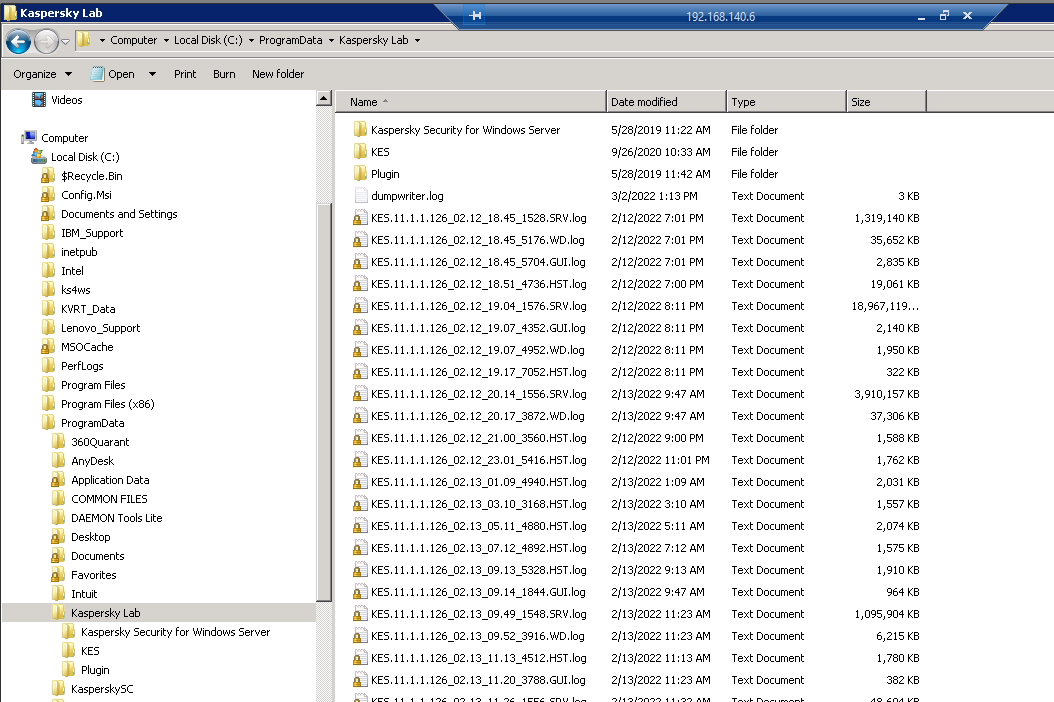
Aside from the famous Microsoft SQL Server dump folder eating all of the hard disk space, there is another kulprit.
To find the folder please go to C:\ProgramData\KasperskyLab\ and there will you find the backup files
Hope it helps
Coffee Cup
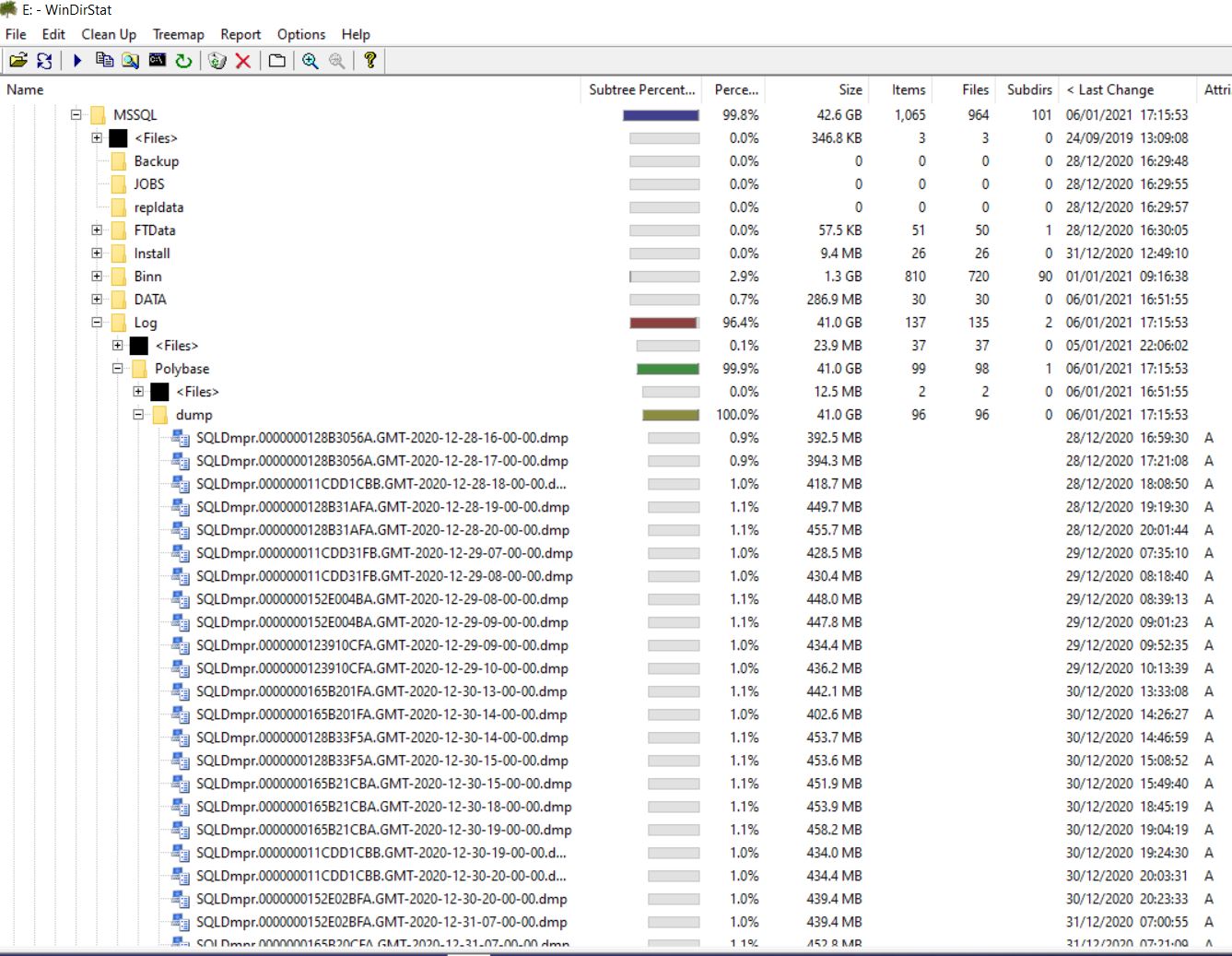
I had a case recently about their server that have zero 0 space remaining in their drive C. i have seen this issue before and it involves the dump files collected every time the server is restarted.
The path to the dump files can be “C:\Program Files\Microsoft SQL Server\MSSQL15.MSSQLSERVER\MSSQL\Log\Polybase\dump”
Another path is “X:\Program Files\Microsoft SQL Server\MSSQL11.MSSQLSERVER\MSSQL\Log”
Recently i have searched if there was a way to turn it off
Some have version folders
| Version | Path |
|---|---|
| SQL Server 2019 | C:\Windows\SysWOW64\SQLServerManager15.msc |
| SQL Server 2017 | C:\Windows\SysWOW64\SQLServerManager14.msc |
| SQL Server 2016 | C:\Windows\SysWOW64\SQLServerManager13.msc |
| SQL Server 2014 | C:\Windows\SysWOW64\SQLServerManager12.msc |
| SQL Server 2012 | C:\Windows\SysWOW64\SQLServerManager11.msc |
net start “SQL Server (MSSQLSERVER)”
next i found is the data collector
USE msdb; GO EXEC dbo.sp_syscollector_disable_collector;
Hope this info help out a fellow traveller
Coffee Cup

Hey guys, i have been experimenting with smtp and gmail for sending to clients using php. Found this wonderful article and thought of saving it here on my blog as a keepsafe. Unfortunately, bobcares does like his blogs to be posted anywhere else. Such a shame.
Anyways, hope you enjoyed the research. It helped me through mine.
Leave some comments blow.
Coffee Cup
phpmailer-smtp-error-password-command-failed
Stuck with PHPMailer – SMTP error password command failed? We can help you.
We may come across this error when we try to send mail using phpmailer().
SMTP ERROR: Password command failed: 534-5.7.14
As part of our Server Management Services, we assist our customers with several SMTP queries.
Today, let us see how to fix this error.
This error may occur due to the below reasons:
Moving ahead, let us see the methods our Support Techs employ in order to fix this.
PHP.ini
SendMail.ini
smtp_port should tally with what is written in our php code.
This will work if our SMTP server is Gmail.
In such a case, we have to solve it as the Administrator.
a) Disable access to less secure apps for all users (Recommended)
b) Allow users to manage their access to less secure apps
c) Enforce access to less secure apps for all users (Not Recommended)
Generally, if option a) does not work, it will start to work with the c) option.
This is related to a security feature in WHM/cPanel.
In addition, we can do this via SSH as well:
/scripts/smtpmailgidonly off
GFIX is Firebird’s command line tool for administration issues like data repair, sweeping, etc.
gfix [options] -user <username> -password <password> <database> [options]
| -user <username> | Database user name |
| -pas[sword] <password> | Database password |
| -fet[ch_password] <filename> | Instead of -password: Fetch password from the file so it is not visible in the command line. When <filename> is stdin, the user will be prompted for the password. [Firebird 2.5] |
When a database has been shut down, only SYSDBA and the database owner are able to connect to the database in order to perform administrative tasks.
| -at[tach] <seconds> | Used with the -shut option. Waits <seconds> seconds for all current connections to end. If after <seconds> seconds there are still connections open, the shutdown will be cancelled and return an error. |
| -f[orce] <seconds> | Used with the -shut option. Waits <seconds> seconds for all connections and transactions to end. After this time, all connections and transactions are cancelled and the database is shut down. Use with caution. |
| -o[nline] | If a -shut operation is pending, it is cancelled. Otherwise, takes a database back online |
| -sh[ut] | Shut down database. Must be used together with -attach, -force or -tran |
| -shut {normal | multi | single | full}-online {normal | multi | single | full} | Firebird 2.0 and later: New shutdown modes:NORMAL: Database is active and online MULTI: Only connection from SYSDBA and the Database Owner will be allowed (compatible mode with Firebird 1.0/1.5) SINGLE: Only one SYSDBA or Database Owner connection will be allowed FULL: Exclusive shutdown: Database is completely offline, no connections will be allowed (it is now possible to access the database file safely on a file basis, e.g. for backups)Use -shut to “go down” the scale of shutting down and -online to “go up” that scale. |
| -tr[an] <seconds> | Used with the -shut option. Waits <seconds> seconds for all running transactions to end. If after <seconds> seconds there are still running transactions, the shutdown will be cancelled. |
gfix -user SYSDBA -password "masterkey" dbserver:/db/mydb.fdb -shut -attach 60
Note that GFIX will terminate with an error if there are still connections open after 60 seconds.
gfix -user SYSDBA -password masterkey dbserver:/db/mydb.fdb -shut -force 60
gfix -user SYSDBA -password masterkey dbserver:/db/mydb.fdb -shut -force 0
gfix -user SYSDBA -password masterkey dbserver:/db/mydb.fdb -online
gfix -user SYSDBA -password masterkey dbserver:/db/mydb.fdb -shut single -force 60
gfix -user SYSDBA -password masterkey dbserver:/db/mydb.fdb -online normal
gfix -user SYSDBA -password masterkey dbserver:/db/mydb.fdb -shut full -force 0
| -f[ull] | Use with the -v option. Checks all records and pages and releases unassigned record fragments |
| -h[ousekeeping] 0 | Switch off automatic sweeping |
| -h[ousekeeping] <n> | Set Sweep Interval to <n> transactions (default is 20000) |
| -i[gnore] | Ignores checksum errors during a validate or sweep |
| -m[end] | Marks corrupt records as unavailable so they are skipped on a subsequent backup |
| -n[o_update] | Use with the -v option. Checks all records and pages and reports errors but does not repair them |
| -sweep | Forces an immediate sweep |
| -v[alidate] | Check database for validity. At the same time, errors are reported and repaired |
gfix -user SYSDBA -password masterkey dbserver:/db/mydb.fdb -v -f
gfix -user SYSDBA -password masterkey dbserver:/db/mydb.fdb -sweep
gfix -user SYSDBA -password masterkey dbserver:/db/mydb.fdb -h 50000
gfix -user SYSDBA -password masterkey dbserver:/db/mydb.fdb -h 0
| -a[ctivate] | Activate Shadow file for database usage |
| -b[uffers] <pages> | Default cache buffers for the database will be set to <pages> pages |
| -c[ommit] <id> | Commits limbo transaction specified by the given <id> |
| -c[ommit] all | Commits all limbo transactions |
| -l[ist] | Display IDs of all limbo transactions and what would happen to each transaction if you would use -t on it |
| -mo[de] read_write | Set mode of database to read/write (default). Requires exclusive access to database (shutdown) |
| -mo[de] read_only | Set mode of database to read-only. Requires exclusive access to database (shutdown) |
| -pa[ssword] <password> | Database password |
| -p[rompt] | Use with -l. Prompts for action. |
| -r[ollback] <id> | Rolls back limbo transaction specified by the given <id> |
| -r[ollback] all | Rolls back all limbo transactions |
| -s[ql_dialect] 1 | Sets SQL dialect 1 for the database |
| -s[ql_dialect] 3 | Sets SQL dialect 3 for the database |
| -t[wo_phase] <id> | Performs automated two-phase recovery for limbo transaction with the given <id> |
| -t[wo_phase] all | Performs automated two-phase recovery for all limbo transactions |
| -user <name> | Database username |
| -w[rite] sync | Enables Forced Writes |
| -w[rite] async | Disabled Forced Writes |
| -z | Show GFIX and server version |
gfix -user SYSDBA -password masterkey dbserver:/db/mydb.fdb -shut -attach 60
gfix -user SYSDBA -password masterkey dbserver:/db/mydb.fdb -shut -force 0
gfix -user SYSDBA -password masterkey dbserver:/db/mydb.fdb -mode read_only
gfix -user SYSDBA -password masterkey dbserver:/db/mydb.fdb -online
gfix -user SYSDBA -password masterkey dbserver:/db/mydb.fdb -sql_dialect 3
gfix -user SYSDBA -password masterkey dbserver:/db/mydb.fdb -write sync
gfix -user SYSDBA -password masterkey dbserver:/db/mydb.fdb -write async

http://www.destructor.de/firebird/gfix.htm


These are suggestions on how to expand and business ideas
Business – bakery , tricycle , egg dealer , barber , coffee , restaurant , fish ball , automotive , organic farming , Korean food , inihaw manok, refilling station
Salary of the people – lifestyle – hobbies – past time
Land – farming , motorcycle terminal, aquaponics, animal farming, tour guides, prepare to stay, scenic spots , food carts , commissary , fiesta , seasonal food (dragon fruit / sili), solar panel, water generation, sell online, prepack food , pigfeed , cooked food
Market – resto, hotels, hospitals, barangay fiesta, party, palengke , weddings , office , carinderya.
To earn money we have 7 options starting with R. When i first heard this one I was amazed on how simple it is. A lesson worth hearing him in person on Youtube

These are tried and tested rules for the rich and those who want to become one. All of these rules we need to keep near our financial wallets in order to survive. There they are

For those who want to enter the real estate market, I have a few ideas on what to do with it.
Things to look out for
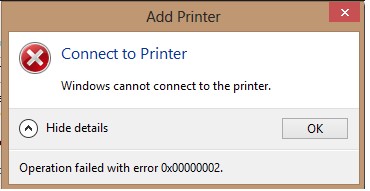
Recently i encountered a problem that doesn’t allow me to add a shared printer. It seems to be new so it might have something to do with the windows update.
Then i found the solutions. Its to add a registry entry. here it is :
HKEY_LOCAL_MACHINE\System\CurrentControlSet\Control\Print\RpcAuthnLevelPrivacyEnabled to 0
Once you do this you can now continue.
Enjoy,
Coffee Cup